
An email goes out on Thursday morning: “Subscribers get early access. 20% off every grinder until Sunday.” Someone taps through on the bus. The page that opens says “Black Friday is coming”, shows a kettle, and asks them to sign up for the newsletter they are already on.
Nothing on that page is wrong. It just isn’t the page the email promised. The reader now has to work out whether early access has started, whether grinders are included, and how the discount applies. Few will do that on a bus.
Getting this right has a name: landing page message match. It matters all year, and most in the week when every inbox is full of promises and the landing page is the only place one can be kept.
A click is half a sentence
Anyone who clicks an ad has been told something, and arrives expecting the rest. Raluca Budiu’s Nielsen Norman Group article on information foraging describes how people judge a page by its “information scent”. When someone lands on a page, that scent comes from “the title, images, and the information that is easily visible above the fold”. If those cues point elsewhere, people assume the page won’t help.
Google’s help page Optimise your ads and landing pages agrees: “When someone clicks your ad, they expect to land on a page that’s relevant to what they saw in your ad. If they don’t find what they expect to immediately, they’re more likely to leave.” Its example: if the ad promises discount shoes at 20% off, people should be able to find and buy shoes at that price on the landing page, and the page should mirror the ad’s call to action. Google’s glossary entry for a landing page lists “the expectations users have based on the ad they clicked” among the things that make up landing page experience, which is one of several factors in a keyword’s Quality Score.
The ad sets the question. The page has a moment to show it heard it.

What a mismatch looks like in November
Picture a Bristol coffee-equipment shop preparing for Black Friday, which falls on 27 November this year. It runs three campaigns:
- a search ad for people looking for a burr grinder: “Burr grinders, 20% off this weekend”;
- a social ad aimed at gift buyers: “Gift sets for the coffee lover who has everything”;
- the subscriber email: early access from Thursday, before the public sale.
All three link to the same sale page. The hero reads “Black Friday deals on everything coffee”, over an espresso machine. Grinders are in the third row of the grid. Gift sets sit behind a filter. Early access isn’t mentioned, so the subscriber can’t tell whether they’re early.
Each visitor has to translate the page back into the ad they clicked. The grinder shopper scrolls. The gift buyer meets a page written for people who already know grinders. The subscriber waits for a code that may not exist. Nobody has been lied to. Everybody has been asked to do the shop’s job.
Match the promise, not just the words
Message match is often reduced to “repeat the ad headline”. That is only the start. Check five things against each campaign.
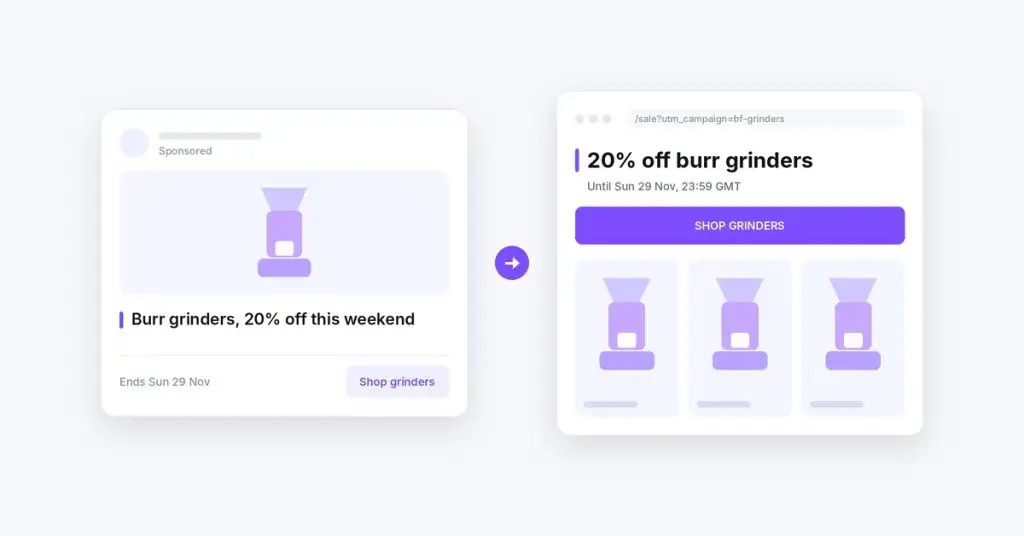
The headline answers the ad. It doesn’t have to be identical. It has to be recognisably the same promise. “20% off burr grinders until Sunday” answers the search ad. “Black Friday deals” doesn’t.
The offer is visible without hunting. If the ad names a product, a category or a discount, it belongs on the first screen, on a phone too. Google’s advice to put important information towards the top of the page counts double during a sale.
The call to action mirrors the ad. If the email says “Use your early-access code”, the button shouldn’t say “Shop now” and leave the code to a footnote. Say plainly whether the discount applies automatically or needs a code.
The conditions travel with the offer. Start, end, what’s included, what isn’t. “Ends Sunday” is a promise too, and it needs a time zone if you sell abroad. Midnight in Bristol is not midnight in Toronto.
The picture shows the thing. A gift-set ad that lands on an espresso-machine hero has broken the match before anyone reads a word.
The rest of the page can stay shared: delivery, returns, reviews, the full range. Message match changes the first answer, not the whole shop.
The cloning trap
The usual fix is a landing page per campaign: copy the sale page, change the hero, publish. With three campaigns, that’s manageable. By late November it is rarely three. There’s a search ad per category, a social variant per audience, an email per segment, a Cyber Monday follow-up and a “last chance” send.
Clones drift. The delivery cut-off is updated on two pages and not the third. A code changes and one page keeps the old one. On the Tuesday after Cyber Monday, a clone nobody remembers is still promising 20% off to anyone holding an old link. That is a broken promise, made by a page the team forgot it owned.
A cleaner model is one landing page with a few named slots that change: the headline, the offer block, the call to action and perhaps the first row of products. Everything else is shared, so an update happens once. A separate page still makes sense when the destination is genuinely different, such as a gift guide.
Tag the traffic so the page can tell
A page can only respond to a campaign it can identify, and UTM parameters do that job. Google Analytics’ guide to collecting campaign data with custom URLs says to always use utm_source, utm_medium and utm_campaign. It warns that values are case-sensitive: “SpringSale and Spring_Sale are considered distinct.”
That matters more once a page reacts to the tags: a typo that used to split a report row can now show the wrong headline. Treat the naming as a contract between the campaign and the page:
- Keep one row per campaign in a shared sheet: the tagged link, the ad’s exact promise, the headline, offer and call to action the page should show, the start and end time, and what shows afterwards.
- Agree lowercase, consistent names before anything is built.
- Test the real link, from the real ad or email, on the live site and on a phone. Redirects and caching can change what actually arrives, and a preview link goes through neither.
Plan the end before the start
Black Friday offers expire. The links don’t. Emails are opened days late and posts get shared. Someone will click “20% off until Sunday” on Tuesday.
Decide now what they see. “This offer ended on Sunday 29 November. Here’s what’s still on” keeps faith with them. A hero that still says 20% off above full prices doesn’t. The start needs the same care: the public shouldn’t see the early-access message, and subscribers shouldn’t find the public sale got there first.
Keep a default too. Some visitors arrive with no tags, and some links lose their parameters on the way. They should land on a page that makes sense on its own.
One landing page, a matched answer for each campaign
ReactWoo Geo is built for the “one page, only the parts that change” approach. With Geo Core Pro, rules can use UTM, campaign and referral conditions, as well as date and time. The Bristol sale page could show the grinder headline and offer to the search campaign, show a gift-set row to the social campaign and show the early-access block to subscribers, while everything else stays shared. AND/OR logic combines conditions, for example the subscriber campaign and a date before the public sale opens. A date and time condition can replace the offer block with an “offer ended” message when the sale closes.
You set this up with native controls in Elementor or Gutenberg, by choosing the section, widget or block that should change, and generated shortcodes cover other compatible builders. You can preview the matched and fallback states before publishing. When a condition can’t be evaluated or no rule matches, your default content stays visible. On WooCommerce, Geo Commerce used with Geo Core Pro can also show, hide or prioritise products by campaign.
The takeaway
Your ad makes the first half of a promise. The landing page either finishes it or makes the visitor start again. Before Black Friday, list every campaign and write down, for each one, what the visitor was promised and what they will see first. Where those two don’t match, fix the page, not the ad.
Then decide how many pages you really need. Usually it’s one good page, a few slots that change, consistent tags, an end date for every promise, and a default for everyone else.